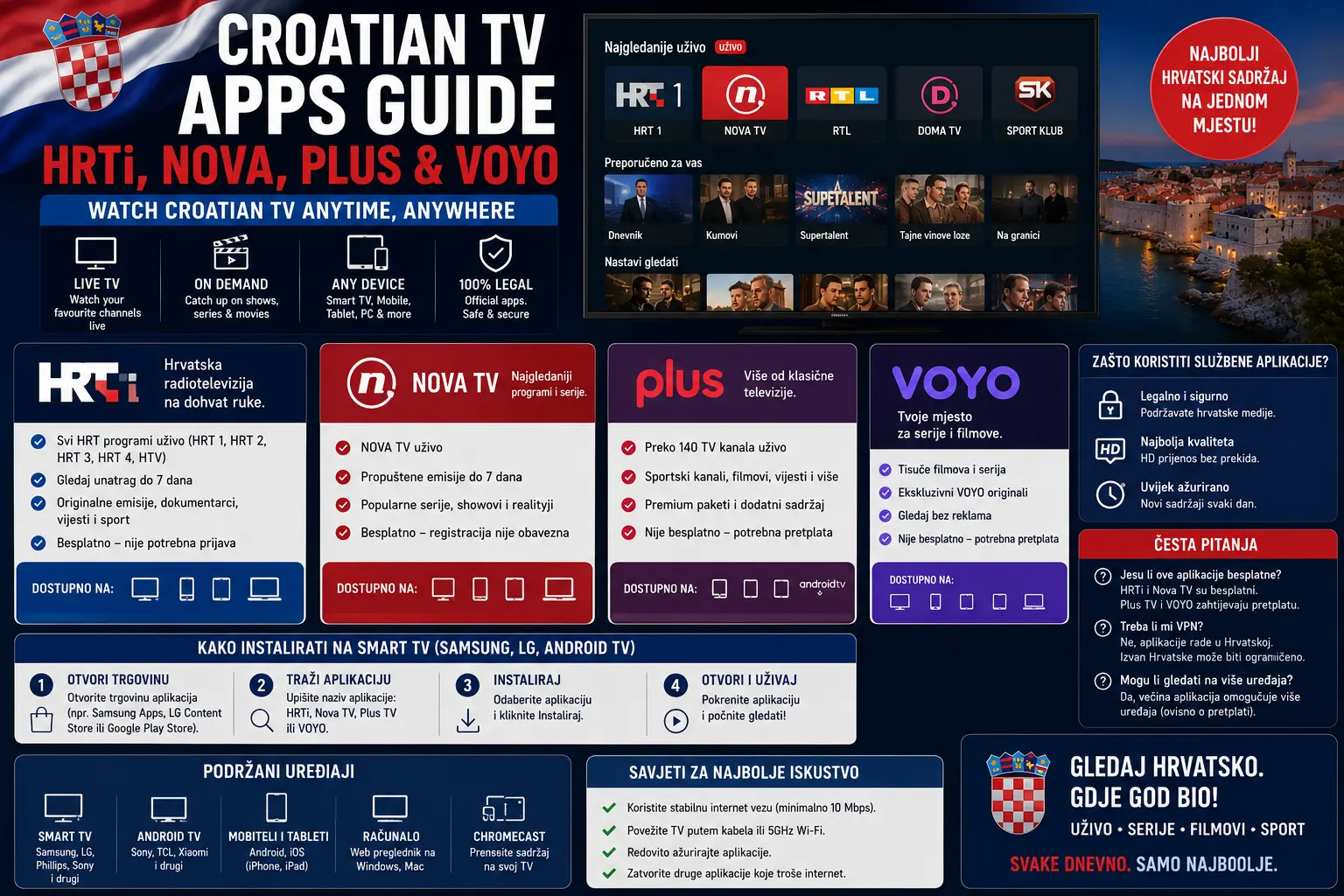
If you live in Croatia, follow Croatian TV abroad, or simply help family members set up television on a modern device, the names HRTi, Nova Plus and VOYO appear often. They are not the same service, and they do not always behave the same way on every device. One app may work well on your phone, another may be easier through a browser, and a third may require a Smart TV app, Android TV, Chromecast or a supported streaming device.
This guide is designed to make that setup easier. Instead of treating every streaming app as one generic “TV app”, we will look at what each Croatian platform is for, where official information says it can be used, and what you should check before relying on it for live television, catch-up viewing, family entertainment or sport.
The goal is practical, not promotional. Always start with the official app, the official broadcaster website and the device store that belongs to your phone, TV or streaming box. If a website promises every channel through unofficial downloads, be careful. Safe streaming begins with correct apps, correct logins and a device that can actually run the service.
Why Croatian TV apps matter in 2026
Croatian households no longer watch television only through traditional antenna, cable or satellite. Many viewers use a mix of live TV, catch-up services, mobile apps and Smart TV platforms. A match might be watched live on the living room TV, a news programme might be replayed on a tablet, and a family show might be resumed later on a phone.
For Croatia-focused viewers, this creates a simple question: which app should you install first? The answer depends on the content. HRTi is linked to Hrvatska radiotelevizija and its national television and radio ecosystem. Nova Plus is connected with Nova TV Group content and apps for internet-based viewing. VOYO is RTL Croatia’s streaming platform for live and on-demand content. Each has its own account rules, device support and viewing limitations.
If you are preparing for live sport, also read our Croatia World Cup 2026 viewing guide. It explains how to prepare devices before important matches. If you already have HRTi but it fails to load, our HRTi troubleshooting guide gives a more detailed step-by-step fix process.
Isprobajte CroTV4K besplatno 24 sata
Testirajte CroTV4K na svom Smart TV-u, Firesticku, Android boxu, mobitelu ili tabletu. Provjerite hrvatske kanale, sport, filmove i kvalitetu streaminga prije odabira plana.
HRTi: public broadcaster content, catch-up and programme guide
HRTi is the official HRT digital service. The official HRTi app listing describes it as an application for watching and listening to HRT national TV and radio channels, with catch-up TV content for up to 72 hours, a video and audio library, and a programme guide. You can check the current app details on the official HRTi app page on Google Play.
For many viewers, HRTi is the first app to install because it covers public broadcaster content and familiar national channels. It can be useful for news, public programming, radio, documentaries, cultural programming and selected sports coverage depending on rights. The key point is that HRTi is not only a live TV button; it also includes replay and library functions, which makes it useful when you miss something live.
If you use HRTi on a Smart TV, check device compatibility before assuming the app will work. Older televisions can lose app support over time. Even if your TV is technically “smart”, the app store may not offer the newest version. In that case, Android TV, Fire TV or another streaming device can sometimes be more reliable than the built-in TV software.
Nova Plus: Nova TV Group content on mobile, tablet and Smart TV
Nova Plus is the official online platform connected with Nova TV Group content. Its official description says it enables fast, simple and legal access to content via the internet and apps for mobile, tablet and Smart TV devices. It also mentions free access with registration and subscription-based exclusive access for selected content. You can review the official page at Nova Plus or the Nova Plus app listing.
Nova Plus can be useful for viewers who want shows, series, movies, sports content, children’s content and Nova TV Group channels in one place. It is especially helpful when your household watches content on more than one screen. A family member may prefer a phone, another may use a Smart TV, and someone else may watch from a tablet.
The most important setup detail is account consistency. If you register on the web, use the same email and password on the TV app or mobile app. If the app says your login is wrong, avoid creating multiple new accounts immediately. First check your email, password manager, confirmation email and subscription status if one is used.
VOYO: RTL Croatia streaming for live and on-demand viewing
VOYO is another important Croatian streaming service, connected with RTL content. The official VOYO Croatia site describes viewing on computer, mobile, Smart TV or tablet, with content available live and on demand. You can visit VOYO Croatia or check app details through official app stores.
VOYO is useful for viewers who want RTL-related shows, domestic productions, entertainment, selected sport, series, kids content and live or on-demand viewing. App listings for VOYO Croatia describe it as a Croatian streaming platform with live and on-demand content, while device support notes explain that the exact TV experience can depend on your setup. The VOYO app page on Google Play is a good place to verify current Android and TV-related details.
On some TVs, the easiest VOYO setup may not be a direct app installed on the TV itself. Depending on the model, Chromecast or an Android TV style device may be needed. This is why the device matters as much as the subscription. Always check the current official instructions before buying hardware only for one app.
HRTi vs Nova Plus vs VOYO: quick comparison
| App | Best for | Typical devices | What to check first |
|---|---|---|---|
| HRTi | HRT TV and radio, catch-up, programme guide and public broadcaster content | Mobile, browser, Smart TV or supported streaming devices | Login, supported TV model, catch-up availability and content rights |
| Nova Plus | Nova TV Group shows, series, entertainment, children’s content and selected channels | Mobile, tablet and Smart TV apps where supported | Registration, account status and app availability on your exact TV |
| VOYO | RTL-related content, live and on-demand programmes, series, shows and sport | Computer, mobile, tablet, Smart TV or casting/Android TV depending on setup | Device compatibility, subscription status and casting requirements |
Best setup for Smart TV users
If you have a modern Samsung, LG, Android TV, Google TV or similar Smart TV, start with the TV’s official app store. Search for HRTi, Nova Plus and VOYO one by one. Do not assume all three apps will be available on every model. TV brands, operating systems and app stores differ, and availability can change over time.
Install only the apps you actually use. Too many apps can make older TVs slow. After installation, sign in, test playback and add the apps to your home screen. If an app is missing, update the TV software and search again. If it still does not appear, your model may not be supported.
For Croatian channels generally, our Croatian channels guide explains how viewers usually organise HRT, RTL, Nova TV and regional categories on modern devices. Even when you use official broadcaster apps, good organisation makes daily viewing easier.
When an external streaming device is better
Built-in Smart TV apps are convenient, but they are not always the most reliable. A TV can remain physically good for ten years while its app platform becomes outdated after only a few years. If apps are missing, slow or freezing, an external streaming device can give the TV a second life.
Android TV and Google TV devices usually work well for people who use many app-based services. Fire TV can also be useful where the needed apps are supported. Chromecast is helpful when a service recommends casting from mobile to TV. The best choice depends on which Croatian app you use most often.
If your family mainly uses HRTi and Nova Plus, check those app pages first. If VOYO is the priority, read the current VOYO device notes before buying anything. The worst mistake is buying a device because it looks popular, then discovering the one app you need is not supported in your region or on that exact model.
Mobile and tablet viewing
Phones and tablets are often easier than TVs because app stores update faster and login is simpler. Mobile viewing is useful for news, replays, short programmes and watching away from the main TV. It can also be a backup when the TV app fails before an important live event.
Keep apps updated, sign in before you need them and avoid switching between many accounts. If playback fails on Wi-Fi, test mobile data. If it works on mobile data but not on Wi-Fi, the home router is probably the issue. If it fails everywhere, check account status, app updates and service availability.
Some apps allow casting from phone to TV. Casting is convenient, but it depends on the phone, TV, Chromecast, Wi-Fi network and app support. If casting frequently disconnects, place the phone and casting device on the same Wi-Fi band and restart both devices.
Browser viewing on laptop or desktop
A browser can be the simplest solution when a TV app is missing. Use official websites, a modern browser and a stable connection. Sign in directly on the service website and test a replay before relying on live content.
Browser issues are usually caused by outdated browsers, blocked cookies, privacy extensions, VPNs, old operating systems or cached site data. If video does not play, test another browser before changing your whole setup. If Chrome fails, try Firefox, Edge or Safari depending on your device.
Avoid random mirror websites that claim to stream Croatian TV without login. They often create pop-ups, fake buttons, tracking problems and unstable playback. Official apps and official websites are slower to set up sometimes, but they are safer and more predictable.
Internet and Wi-Fi preparation
Croatian TV apps need a stable connection, not just a high advertised speed. A short video might play fine while a live match buffers because live streams are less forgiving. Wi-Fi distance, thick walls, old routers and crowded home networks can all reduce stability.
- Use Ethernet for the main TV if possible.
- Use 5 GHz Wi-Fi when the device is close to the router.
- Use 2.4 GHz when distance and walls are more important than speed.
- Restart the router before important live programmes.
- Pause large downloads, cloud backups and console updates.
- Keep streaming devices ventilated and not hidden in hot spaces.
If all apps buffer, the problem is probably not only HRTi, Nova Plus or VOYO. In that case, use the step-by-step process in our streaming buffering guide to check Wi-Fi, router placement, device storage and app cache in a sensible order.
Using Croatian TV apps abroad
Many Croatian viewers live abroad or travel frequently, so this question matters. Some content may be available outside Croatia, while other content may be limited by rights. This is common with live sport, films, foreign series and certain licensed programmes.
If an app says the content is not available in your location, do not assume the app is broken. It may be a rights restriction. Check the official help page or the message inside the app. Turning on a VPN is not always a clean fix because it can slow down playback, trigger location errors or conflict with account rules.
For diaspora households, the best approach is to build a legitimate device setup first: official apps, one reliable TV device, good Wi-Fi and backup mobile access. If you also use playlist-based apps for personal organisation, our IPTV Smarters Pro setup guide explains general app setup without replacing official broadcaster services.
Simple setup plan for families
- Choose the main TV device for the household.
- Install HRTi, Nova Plus and VOYO only from official stores or official websites.
- Sign in with the correct account on each app.
- Test one live stream and one on-demand video in each app.
- Move the apps to the top row of the TV home screen.
- Write down which account email belongs to each app.
- Keep one mobile device signed in as a backup.
- Restart the TV and router before major live events.
This plan is simple, but it prevents many common family problems: forgotten passwords, missing apps, unsupported TVs and last-minute buffering. The more viewers in the household, the more important it is to keep the setup easy.
Final thoughts
HRTi, Nova Plus and VOYO each have a useful place in Croatian streaming. HRTi is central for HRT television and radio, Nova Plus helps viewers follow Nova TV Group content across internet-connected devices, and VOYO brings RTL-related live and on-demand content into the app-based viewing world.
The best setup is not always the most complicated one. Use official apps, check compatibility before match day, keep the TV software updated and make Wi-Fi reliable. If a Smart TV app is missing or slow, consider an external device instead of replacing the entire television.
Most importantly, prepare before you need the app. A five-minute test today can save you from missing the start of a live match, news programme or family show tomorrow.
Isprobajte CroTV4K besplatno 24 sata
Testirajte CroTV4K na svom Smart TV-u, Firesticku, Android boxu, mobitelu ili tabletu. Provjerite hrvatske kanale, sport, filmove i kvalitetu streaminga prije odabira plana.
Frequently asked questions
What are the main Croatian TV apps?
The main Croatian TV apps many viewers use are HRTi for HRT television and radio content, Nova Plus for Nova TV Group content, and VOYO for RTL-related live and on-demand content.
Can I watch Croatian TV apps on a Smart TV?
Yes, but compatibility depends on the app and TV model. HRTi and Nova Plus list Smart TV access among their supported options, while VOYO may depend on the TV, Chromecast or Android TV setup.
Do Croatian TV apps work outside Croatia?
Some content may work outside Croatia, but rights restrictions can apply, especially for films, foreign series and live sports. Check the message shown inside the app and the official terms.
Which device is best for Croatian TV apps?
A modern Smart TV is convenient when the app is supported. If the TV is older, Android TV, Fire TV or Chromecast-style devices can be more flexible for app updates and streaming stability.
Why do Croatian TV apps buffer or freeze?
Buffering is often caused by weak Wi-Fi, old app versions, low device storage, outdated TV software, busy home networks or content delivery issues during popular live events.
Should I use unofficial app downloads?
No. Use official app stores and official broadcaster websites whenever possible. Unofficial downloads can create security risks, broken playback, pop-ups or outdated app versions.
Need help setting up Croatian TV apps?
Message CroTV4K on WhatsApp and tell us your TV model, app name and the issue you see. We can help with general setup, app installation and streaming stability checks.
Contact CroTV4K on WhatsApp